RAID levels explained for a home NAS
For most home NAS owners: two drives means RAID 1 (mirror). Three or more equal drives means RAID 5. Four or more large drives means think about RAID 6. Mixed sizes on Synology-style systems means SHR. RAID 0 is never for files you care about.
Updated 2026-09-23 · Sources below
The idea in 30 seconds
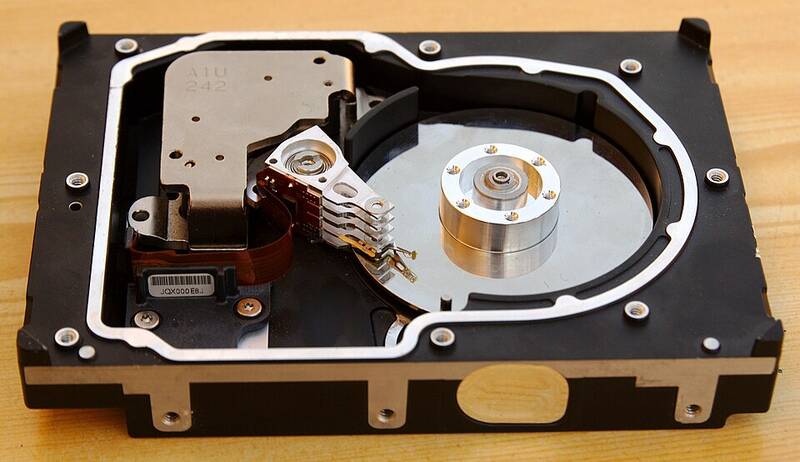
RAID makes several drives act as one. If a drive dies, the rest cover for it. That is the whole idea: shared risk across drives.
There are two ways to stay safe. A mirror keeps full copies on two drives. Parity keeps math notes that can rebuild lost data. Parity wastes less space, but rebuilds take longer.
A common question is whether RAID counts as backup. It does not. RAID guards against drive death only. Fire, theft, ransomware, or your own delete key still take everything at once. For that you need real backup.
Pick your level in 4 steps
- Count your drives. Two drives points to RAID 1 (or SHR on Synology). Three or more equal drives points to RAID 5. Four or more big drives points to RAID 6. Only speed-tolerant scratch files ever point to RAID 0.
- Learn what each level costs. Every level trades space for safety. Read the table below once, slowly. The “usable space” column is the price you pay.
- Run your exact numbers. Open our RAID capacity calculator and type in your drive sizes. Try your plan and one level up. The gap is often smaller than you fear.
- Add backup anyway. Whatever level you pick, pair it with an offsite copy. RAID buys time against one dead drive. Backup buys a second copy elsewhere. You need both.
What each level gives you
| Level | Drives needed | Usable space | Can lose | Best for |
|---|---|---|---|---|
| RAID 0 | 2+ | All of it | Nothing: one dead drive kills all | Temp files you can re-download |
| RAID 1 | 2 | One drive | Either drive | A first 2-bay NAS, family photos |
| RAID 5 | 3+ | All minus one | Any one drive | Three to five equal drives |
| RAID 6 | 4+ | All minus two | Any two drives | Large drives (8 TB and up), 4+ bays |
| RAID 10 | 4+ (even count) | Half of total | One per pair, if lucky | Speed plus safety, at a space cost |
| SHR / Unraid-style | 2+ | Like RAID 1, then like RAID 5, with less waste | Same as above | Mixed old and new drive sizes |
SHR is Synology’s flexible RAID. With two drives it acts like RAID 1. With more it acts like RAID 5, but it wastes less space when drives differ. Unraid takes a different path: one or two parity drives guard a pool where each drive keeps its own files. Both suit beginners who add drives over time.
Worked examples
Say you have two 8 TB drives. RAID 1 gives 8 TB to use. Simple.
Say you have four 8 TB drives. RAID 5 gives 24 TB. RAID 6 gives 16 TB. RAID 10 gives 16 TB. For most people storing photos and films, RAID 5 or 6 wins here. RAID 10 only wins if you need speed.
Say you have mixed sizes: 4, 4, and 8 TB. Plain RAID 5 trims every drive to the smallest, so you get only 8 TB. SHR-like math gives 12 TB instead. That 4 TB gap is why mixed-size owners keep asking about SHR.
One more wrinkle: makers count in decimal TB, but your OS counts in TiB. The OS number shows about 9% less. That gap is normal. Nothing is lost.
Three mistakes beginners make
Buying the wrong drive type. Get CMR drives (sold as “NAS-rated”), not cheap SMR desktop drives. SMR drives slow down badly during long rebuilds. Check the maker spec sheet for the letters CMR before you buy.
Using RAID 0 for the wrong files. RAID 0 is fine for a video edit cache you can rebuild in a day. It is a trap for the only copy of anything. If losing it would hurt, it does not belong on RAID 0.
Never checking drive health. Turn on the monthly data check (often called a “scrub”) if your system offers one. And read the drive’s built-in health report (called SMART). Replace a drive at the first warning, not the second. RAID can only save you if the other drives are healthy.
Quick answers
Is RAID a backup?
No. RAID keeps you running when a drive dies. Backup gives you a second copy somewhere else. Ransomware, fire, theft, and bad deletes beat every RAID level. Do both.
Can I mix drive sizes?
Plain RAID trims all drives to the smallest, which wastes space. SHR and Unraid waste far less on mixed sizes. Type your mix into our calculator to see both numbers.
RAID 5 or RAID 6 for home use?
With small drives (4 TB and under), RAID 5 is fine for most people. With big drives (8 TB and up), lean to RAID 6. Big-drive rebuilds take days, and the extra parity covers a second failure during that window.
What is SHR, exactly?
Synology Hybrid RAID. SHR with one-drive safety acts like RAID 1 or 5 depending on drive count. SHR-2 acts like RAID 6. Its trick is wasting less space on mixed sizes.
Can I add drives later?
On Synology SHR and Unraid, yes, with some rules (new drives must be big enough). On TrueNAS with ZFS, adding drives to an existing group is much harder, so plan your bays ahead. When in doubt, buy a case with room to grow.
Go deeper
- Our mixed-drive RAID calculator — type your sizes, see every level side by side.
- Synology RAID calculator — official SHR math to cross-check against.
- Seagate RAID calculator — second opinion on usable space.
- raid-calculator.com — plain third-party capacity tool.
- TrueNAS documentation — how pools and parity work on the ZFS side.
- r/homelab — search past threads; RAID questions come up weekly.
Bottom line: match the level to your drive count, check the math in the calculator, and pair it with offsite backup. Most guides skip that last sentence. We put it twice.
Sources
Was this helpful?
Spot an error?